
NCA-AIIO Study Guide & Cheat Sheet (NVIDIA AI Infrastructure and Operations)
NCA-AIIO, NVIDIA’s AI Infrastructure and Operations associate exam, is 50 questions in 60 minutes for $125, scored pass or fail, and its biggest domain is AI Infrastructure at 40%. This free study guide gives you the exam facts, NVIDIA’s published domains, the official prep resources, study tips, a topic cheat sheet and a full glossary. No sign-up needed.
Ready to practice? Take the free NCA-AIIO practice quiz → · Get the full exam prep →
NCA-AIIO at a glance
| Exam | NVIDIA AI Infrastructure and Operations certification exam (NCA-AIIO) |
|---|---|
| Credential | NVIDIA-Certified Associate: AI Infrastructure and Operations |
| Level | Associate (entry level) |
| Price | $125 USD (taxes may apply in some countries) |
| Exam time | 60 minutes |
| Questions | 50 |
| Scoring | Pass or fail; NVIDIA doesn’t report a score or publish a cut score |
| Delivery | Online, remotely proctored; you need a Certiverse account |
| Language | English |
| Prerequisites | None required; NVIDIA lists a basic understanding of data center infrastructure |
| Validity | 2 years; you recertify by retaking the exam |
| Retakes | Buy the exam again after a 14-day wait; no more than five attempts in 12 months |
| Official study guide | An exam study guide PDF linked from NVIDIA’s exam page |
Checked against NVIDIA’s NCA-AIIO exam page and NVIDIA’s certification FAQ on October 8, 2026.
NCA-AIIO exam domains
| Domain | Weight | What NVIDIA lists (summarized) |
|---|---|---|
| Essential AI Knowledge | 38% | AI vs machine learning vs deep learning, why AI adoption accelerated, key use cases and industries, GPU vs CPU architecture, training vs inference requirements, NVIDIA’s software stack and solutions, and the software used across the AI development and deployment lifecycle. |
| AI Infrastructure | 40% | Hardware for AI training use cases, scaling GPU infrastructure, data center power, cooling and facility requirements, on-premises vs cloud, accelerated computing clusters, networking requirements, protocols and high-speed network options for AI workloads, and what a DPU does. |
| AI Operations | 22% | Data center management and monitoring, cluster orchestration and job scheduling, what to measure when monitoring GPUs, and virtualizing accelerated infrastructure. |
Domain names and weights are NVIDIA’s; the summaries are ours, from the objectives on NVIDIA’s exam page.
Who NCA-AIIO is for
NCA-AIIO is NVIDIA’s infrastructure-side associate exam. It is aimed at the people who rack, network, provision and operate GPU systems, not at the people who train models on them. NVIDIA’s own list of candidates runs from data center technicians, network engineers and systems administrators to IT managers, solution architects and even sales and business-line roles. If your week involves capacity, drivers, schedulers and why a job is not getting the GPUs it asked for, this is your exam. If it involves loss curves, look at NCA-GENL instead, and our side-by-side comparison if you cannot decide.
One quirk shapes how you should study: NVIDIA reports this exam as pass or fail and never gives you a score. There is no “aim for 70% and coast” option, because you will never learn what you scored.
How to use this guide
- Start with the AI concepts domain, however obvious it looks. Essential AI Knowledge is 38% of the exam. It is the part a data scientist finds trivial and a network engineer has never needed, and infrastructure people lose this exam here, not on the hardware.
- Skim the tips next. They cover how the questions are framed, which matters more than usual when you cannot see a score.
- Treat the cheat sheet as a checklist. Mark anything you could not explain to a colleague without looking it up. That list is your study plan.
- Then answer questions under time. Start with our free NCA-AIIO practice questions, which are written from the same blueprint and explain every answer.
NVIDIA’s official NCA-AIIO prep
NVIDIA’s NCA-AIIO exam page links two things worth your time before any third-party material:
- The official exam study guide (PDF). It sets out the objectives behind the three domains above.
- AI Infrastructure and Operations Fundamentals. NVIDIA’s recommended self-paced course for enterprise professionals, which NVIDIA says typically takes about seven hours. The exam page doesn’t state its price, so check it before you enroll.
NVIDIA’s exam page also lists its preparation topics: accelerated computing use cases, AI, machine learning and deep learning, GPU architecture, NVIDIA’s software suite, and infrastructure and operations considerations for adopting NVIDIA solutions.
Before you book
Worth checking first: what NCA-AIIO costs, including what NVIDIA does not publish, and how it compares with NCA-GENL if you’re choosing between NVIDIA’s two associate exams. Remember the retake rule: a fail means paying again and waiting 14 days. For the bigger picture, the AI certification index lists verified facts for every AI exam we track.
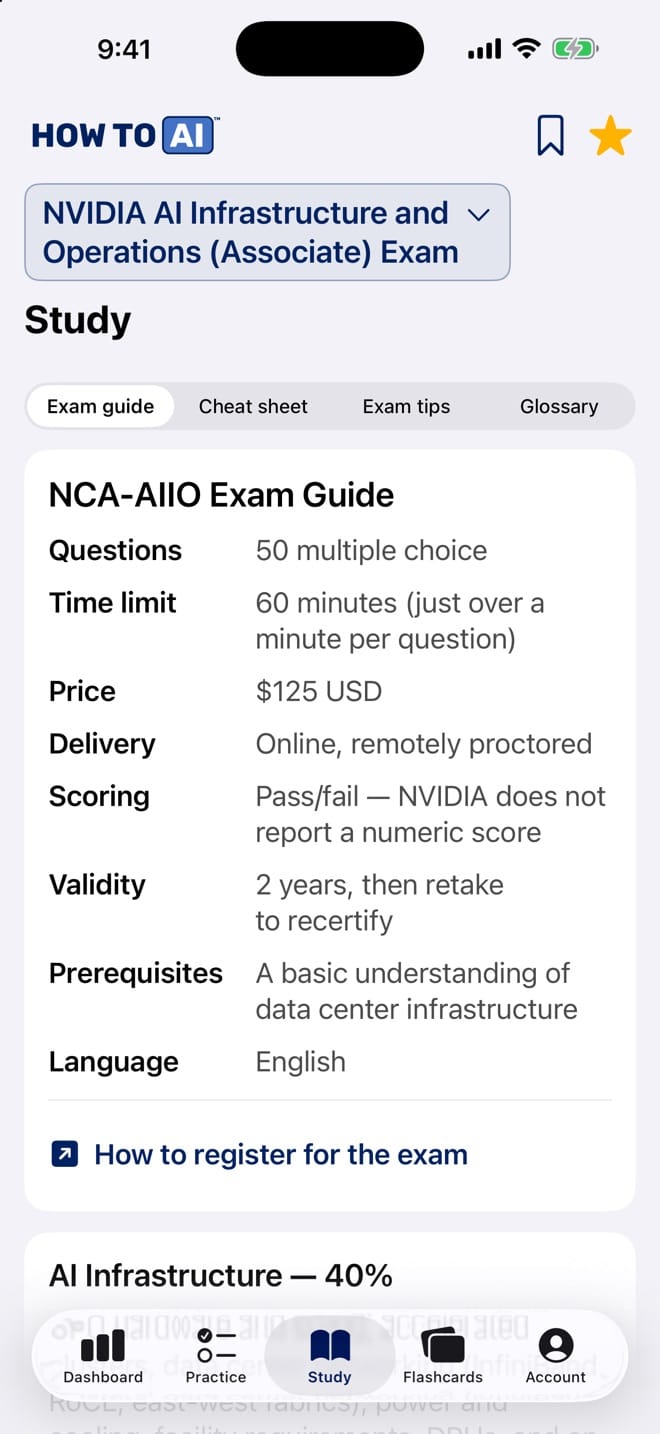
NCA-AIIO Exam Guide
| Questions | 50 multiple choice |
|---|---|
| Time limit | 60 minutes (just over a minute per question) |
| Price | $125 USD |
| Delivery | Online, remotely proctored |
| Scoring | Pass/fail — NVIDIA does not report a numeric score |
| Validity | 2 years, then retake to recertify |
| Prerequisites | A basic understanding of data center infrastructure |
| Language | English |
Exam domains
| Domain | Weight | What it covers |
|---|---|---|
| AI Infrastructure | 40% | GPU hardware and sizing, accelerated clusters, data center networking (InfiniBand, RoCE, east-west fabrics), power and cooling, facility requirements, DPUs, and on-prem vs cloud trade-offs. The biggest domain — roughly 20 of your 50 questions. |
| Essential AI Knowledge | 38% | AI vs ML vs DL, why AI took off, training vs inference, GPU vs CPU architecture, the NVIDIA software stack (CUDA, NGC, TensorRT, Triton, AI Enterprise), the AI development life cycle, and industry use cases. Roughly 19 of 50 questions. |
| AI Operations | 22% | Running the cluster: job scheduling and orchestration (Slurm, Kubernetes, GPU Operator), GPU monitoring and health (DCGM, utilization, temperature, power), and virtualization choices (MIG, vGPU, passthrough). Roughly 11 of 50 questions. |
Who it’s for: Data center technicians, DevOps and networking engineers, IT managers, sysadmins, solution architects, and technical sales — anyone who runs, supports, or sells AI infrastructure.
Study & test-day tips
- Budget your time: 50 questions in 60 minutes leaves about 70 seconds each. Answer what you know fast, flag the rest, and come back.
- The exam is conceptual, not a spec sheet. Know what NVLink, DPUs, MIG, and DCGM are FOR — not their generation-by-generation bandwidth numbers.
- Read for the qualifier words: 'most likely', 'primary purpose', 'best fits'. Two options are usually defensible; the qualifier picks the winner.
- Map every study hour to the blueprint: AI Infrastructure is 40% of the exam — if your practice accuracy is weakest there, that's where hours pay off most.
- Think 'what problem does this solve?' for every technology. Exam distractors are usually real technologies attached to the wrong problem.
- Training vs inference is a recurring lens: throughput vs latency, batch vs real-time, datacenter vs edge. Many questions hinge on knowing which side you're on.
- For scenario questions, identify the bottleneck first (compute, memory, network, storage, data pipeline) — the right answer almost always addresses that specific bottleneck.
- Don't leave blanks. There's no penalty for guessing — eliminate two options and pick the more specific remaining answer.
- Take the timed mock in this app at least twice before booking. The time pressure, not the content, is what surprises most first-time candidates.
- Book the exam when your practice readiness is consistently 80%+. The real exam is pass/fail, so you want margin, not a coin flip.
Cheat sheet
Hardware & interconnects
- GPU vs CPU: thousands of simple parallel cores + high memory bandwidth vs few complex cores optimized for sequential work
- NVLink: direct GPU-to-GPU interconnect inside a server — far faster than PCIe
- NVSwitch: switch fabric that lets every GPU in a node talk to every other at full NVLink speed
- DPU (BlueField): offloads networking, storage, and security from the host CPU; isolates infrastructure from tenant workloads
- MIG: partitions one GPU into up to 7 hardware-isolated instances (compute + memory)
Networking
- InfiniBand: lowest-latency, highest-bandwidth fabric for multi-node training
- RoCE: RDMA over Converged Ethernet — direct memory-to-memory transfers on Ethernet hardware
- East-west traffic (node-to-node) dominates AI clusters; design for non-blocking bandwidth between GPU nodes
- Distributed training = frequent gradient synchronization (all-reduce) — network becomes the bottleneck as you scale nodes
Facilities
- AI racks draw several times the power of enterprise racks — plan power delivery, floor loading, and cooling per rack
- Liquid cooling (direct-to-chip, rear-door) appears when rack density exceeds what air can remove
- On-prem: control, predictable cost at high utilization. Cloud: elasticity, no capex, fast start — best for bursty or exploratory work
NVIDIA software stack
- CUDA: the parallel computing platform everything else builds on
- NGC: catalog of GPU-optimized containers, pretrained models, SDKs
- TensorRT: optimizes trained models for fast inference
- Triton Inference Server: serves models from any framework at scale
- NVIDIA AI Enterprise: the supported, validated enterprise software suite
- DCGM: fleet-level GPU monitoring, health, and diagnostics
Operations
- Slurm: HPC-style batch job scheduler (queues, partitions, priorities)
- Kubernetes + GPU Operator: container orchestration with automated GPU driver/runtime/monitoring setup
- Low GPU utilization usually means a starved data pipeline, not broken GPUs — check input/storage/CPU preprocessing first
- Monitor utilization, memory, temperature, power, ECC errors; heat = throttling = silent performance loss
- vGPU: share GPUs across many light VMs (VDI, notebooks). Passthrough/bare metal: maximum performance for training
Core AI concepts
- AI ⊃ ML ⊃ DL (deep learning uses many-layered neural networks)
- Training: heavy, iterative, throughput-oriented. Inference: serving predictions, latency-oriented
- AI's rise = big data + GPU compute + better algorithms (all three together)
- AI lifecycle: data prep → train/validate → deploy → monitor → retrain
Glossary
- All-reduce
- The collective communication step in distributed training where every node exchanges and combines gradient updates each iteration.
- BlueField
- NVIDIA's DPU product line — a programmable processor on the network card that offloads infrastructure tasks from the host CPU.
- CUDA
- NVIDIA's parallel computing platform and programming model that lets software run general-purpose computation on GPUs.
- cuDNN
- NVIDIA's GPU-accelerated library of deep learning primitives (convolutions, attention, etc.) used by frameworks like PyTorch and TensorFlow.
- DCGM
- Data Center GPU Manager — NVIDIA's tool for monitoring GPU health, telemetry, and diagnostics across a fleet.
- DGX
- NVIDIA's line of purpose-built AI systems combining multiple GPUs, NVLink/NVSwitch, and tuned software.
- DPU
- Data Processing Unit — offloads networking, storage, and security from the host CPU and isolates infrastructure from workloads.
- East-west traffic
- Server-to-server traffic inside the data center; dominates AI clusters due to gradient synchronization.
- Gradient synchronization
- Exchanging weight updates between workers in distributed training so all copies of the model stay consistent.
- HBM
- High Bandwidth Memory — the stacked, very fast memory on data center GPUs that feeds their thousands of cores.
- InfiniBand
- A high-bandwidth, low-latency network fabric widely used to connect nodes in AI and HPC clusters.
- Inference
- Running a trained model on new inputs to produce predictions; typically latency-sensitive.
- Kubernetes
- Container orchestration platform; with NVIDIA's GPU Operator it automates the GPU software stack for AI workloads.
- MIG
- Multi-Instance GPU — partitions one physical GPU into up to seven isolated instances with dedicated compute and memory.
- MLOps
- The practice and tooling for taking ML models through data prep, training, deployment, and monitoring repeatably.
- NCCL
- NVIDIA Collective Communications Library — optimized multi-GPU/multi-node communication primitives (like all-reduce) used in distributed training.
- NGC
- NVIDIA's catalog of GPU-optimized containers, pretrained models, and SDKs.
- NVIDIA AI Enterprise
- The supported, validated enterprise suite of NVIDIA's AI software for production deployments.
- NVLink
- NVIDIA's direct GPU-to-GPU interconnect, much faster than PCIe, for multi-GPU systems.
- NVSwitch
- A switch chip that connects many GPUs at full NVLink bandwidth so all GPUs in a system can communicate simultaneously.
- Parallel file system
- Shared storage (e.g., Lustre-class) that delivers high-throughput data access to many compute nodes at once.
- PCIe
- The standard expansion bus connecting GPUs to CPUs; slower than NVLink for GPU-to-GPU communication.
- PUE
- Power Usage Effectiveness — total facility power divided by IT equipment power; closer to 1.0 means a more efficient data center.
- RDMA
- Remote Direct Memory Access — one server reads/writes another's memory directly, bypassing the CPU and OS network stack.
- RoCE
- RDMA over Converged Ethernet — brings RDMA's low latency to Ethernet fabrics.
- Slurm
- A widely used HPC job scheduler that queues, prioritizes, and places batch jobs (including GPU training) across a cluster.
- TensorRT
- NVIDIA's SDK that optimizes trained models (precision, fusion, tuning) for fast inference.
- Throttling
- A GPU automatically reducing clock speeds to protect itself when too hot or power-limited — silently degrading performance.
- Training
- The compute-intensive process of learning model weights from data; throughput-oriented, often distributed.
- Triton Inference Server
- NVIDIA's open-source server for deploying models from any framework at scale with dynamic batching.
- vGPU
- NVIDIA virtual GPU — shares physical GPUs across multiple virtual machines, suited to lighter, fragmented workloads.
- Utilization
- The share of time a GPU is doing work; persistently low utilization usually signals a starved data pipeline.
Put it into practice
Studying is step one. Practice questions are where it sticks. Start with free NCA-AIIO practice questions, then go Pro for the full 300-question bank, timed mocks, and an AI tutor.
HOW TO // AI is not affiliated with or endorsed by NVIDIA. NCA-AIIO is a certification of NVIDIA Corporation; we reference it descriptively. All content is original.
Take this guide with you
The same study guide, cheat sheet and glossary live in HOW TO // AI CERT on iPhone, next to 5,245 original practice questions, timed mock exams, flashcards and an AI tutor powered by Claude. Free to download, with a free question set for every exam.

Practice for every AI & cloud cert
- NVIDIA NCA-GENL practice questions
- AWS AIF-C01 practice questions
- AWS MLA-C02 practice questions
- AWS MLA-C01 practice questions
- Microsoft AI-901 practice questions
- Microsoft AI-103 practice questions
- VMware VCP-VCF Administrator practice questions
- CompTIA AI Fundamentals practice questions
- Google Cloud Generative AI Leader practice questions
- Oracle OCI AI Foundations practice questions
- CertNexus AIP-210 practice questions
- Anthropic CCAO-F practice questions
- Anthropic CCDV-F practice questions
- Anthropic CCAR-F practice questions
- Anthropic CCAR-P practice questions
- All AI & cloud exam prep →
Frequently asked questions
How much does the NVIDIA NCA-AIIO exam cost?
$125 USD, taken online with remote proctoring through a Certiverse account. Taxes may apply in some countries, and a retake means buying the exam again.
How many questions is NCA-AIIO and how is it scored?
50 questions in 60 minutes. Scoring is pass or fail: NVIDIA does not report a numeric score or publish a cut score, so aim for consistently strong practice results before booking.
What are the NCA-AIIO exam domains?
Three: Essential AI Knowledge (38%), AI Infrastructure (40%) and AI Operations (22%). Infrastructure covers GPUs, clusters, networking, power and cooling; operations covers monitoring, orchestration, job scheduling and virtualization.
Is there an official NCA-AIIO study guide?
Yes. NVIDIA links an exam study guide PDF from its NCA-AIIO exam page, and it recommends a self-paced course, AI Infrastructure and Operations Fundamentals, that typically takes about seven hours.
How hard is NCA-AIIO?
It is an entry-level associate exam that NVIDIA says validates foundational concepts, so study what technologies such as MIG, DCGM, NVLink and Slurm are for rather than command syntax. NVIDIA's stated prerequisite is a basic understanding of data center infrastructure, and AI Infrastructure is the biggest domain at 40%.
How long is the NCA-AIIO certification valid?
2 years. NVIDIA's only renewal path is retaking the exam.
What happens if I fail NCA-AIIO?
You buy the exam again and wait 14 days before retaking it. NVIDIA allows no more than five attempts at the same exam in 12 months, counted from your first purchase.
Should I take NCA-AIIO or NCA-GENL?
Take NCA-AIIO if you work on the infrastructure side: GPUs, networking, clusters and operations. Take NCA-GENL if you build or test generative AI and LLM applications. Both are $125, 60-minute associate exams.