
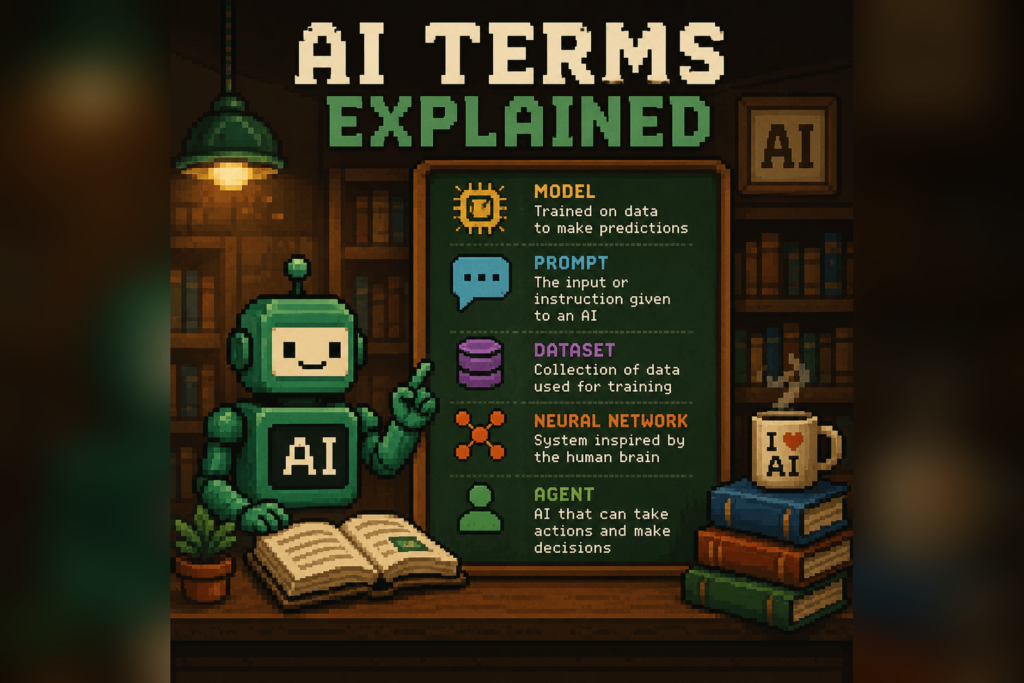
If you keep running into AI words you nod along to but couldn’t actually explain, this page is for you. It’s a plain-English glossary of the terms you’ll see most often, written without the hype and without assuming you have a computer science degree.
Each entry starts with a clean one-sentence definition, then adds a little context where it helps. Skim it, search it, or read it top to bottom. Prepping for an exam? Our AI & cloud certification study guides include exam-specific glossaries and cheat sheets. The goal is simple: next time someone says “we’re using RAG with a bigger context window,” you’ll know exactly what they mean.
Generative AI
Generative AI is software that creates new content, such as text, images, audio, or code, rather than just sorting or labeling existing data. It works by learning patterns from huge amounts of examples and then producing something new that fits those patterns. Tools like ChatGPT, Claude, and Midjourney are all generative AI. If you’ve ever asked a chatbot to write an email or make a picture, you’ve used it, and you can see how AI chatbots really work under the hood.
Large Language Model (LLM)
A large language model is a type of AI trained on enormous amounts of text to predict and generate language one word at a time. It’s the engine behind chatbots like ChatGPT and Claude, and it’s “large” because it’s built from billions of internal settings learned during training. An LLM doesn’t look facts up the way a search engine does; it generates the most likely next words based on patterns it learned, which is also why it can sometimes be confidently wrong. For a friendly walkthrough, see how AI chatbots really work.
Prompt
A prompt is the instruction or question you give an AI to tell it what you want. It can be a single line (“summarize this”) or a detailed brief with examples, rules, and context. The clearer and more specific your prompt, the better the answer tends to be. If you want a head start, here are the AI prompts I use most.
Prompt engineering
Prompt engineering is the practice of writing and refining your instructions to get more useful, reliable answers from an AI. It’s less about secret tricks and more about being specific: giving context, showing an example, and saying what good output looks like. Small wording changes can produce very different results, so it’s worth iterating. My prompt refinement 101 guide walks through the basics step by step.
Token
A token is a small chunk of text, often a word or part of a word, that an AI reads and generates one piece at a time. Models don’t process whole sentences at once; they break text into tokens, and roughly four characters or three-quarters of a word equals one token in English. Tokens matter because they’re how usage is measured and billed, and how the limits on input and output length are counted. As a rough rule, 1,000 tokens is about 750 words.
Context window
The context window is the total amount of text an AI can keep in mind at once, measured in tokens. It includes your prompt, any documents you paste in, and the model’s own reply, all counted together. When a conversation runs past the limit, what happens depends on the tool: some apps trim or summarize the oldest parts so the model effectively forgets them, while others simply stop or show an error. A bigger context window lets you work with longer documents and longer conversations without the AI losing the thread.
Hallucination
A hallucination is when an AI states something false or made-up as if it were true. It happens because models generate plausible-sounding text rather than checking facts, so they can invent quotes, citations, statistics, or events that never existed. The tricky part is that hallucinations often sound just as confident as correct answers, which is why you should verify anything important. Learn to spot them in my guide on how to catch AI hallucinations.
AI agent
An AI agent is a system that can take a goal and carry out multiple steps to reach it, often using tools like web search, files, or other software along the way. Instead of answering a single question, it plans, acts, checks the result, and keeps going until the task is done. For example, you might ask an agent to research three vendors, compare their pricing, and draft a summary, and it works through each part on its own. Agents are more capable than a plain chatbot, but they also need clearer guardrails because they take actions, not just words.
System prompt and custom instructions
A system prompt is a behind-the-scenes instruction that sets an AI’s role, tone, and rules before you ever type a message. Custom instructions are the consumer version of the same idea: settings where you tell a chatbot who you are and how you want it to respond every time. Together they shape default behavior, so the AI doesn’t need to be reminded of your preferences in each new chat. Think of it as briefing an assistant once instead of repeating yourself all day.
Fine-tuning
Fine-tuning is the process of taking an already-trained model and training it further on a focused set of examples so it gets better at a specific task or style. It’s how a general model can be nudged to write in a company’s voice, follow a particular format, or handle a niche domain. Fine-tuning changes the model itself, which makes it different from simply giving better instructions in a prompt. Most people never need it, but it’s useful when you have a narrow, repeatable job and plenty of examples.
RAG (retrieval-augmented generation)
RAG, short for retrieval-augmented generation, is a method that lets an AI pull in relevant information from your own documents before it answers. Instead of relying only on what it learned during training, the system searches a knowledge source, grabs the most relevant passages, and feeds them to the model as context. This is how a chatbot can answer questions about your company handbook or product docs accurately and with fewer made-up details. In short, RAG gives the model an open book to read from before it responds.
Multimodal AI
Multimodal AI can understand and work with more than one type of input, such as text, images, audio, and sometimes video, in the same conversation. A multimodal model can read a chart you upload, describe a photo, or transcribe a voice note, instead of handling text alone. This is why you can now snap a picture of a broken appliance and ask a chatbot what’s wrong with it. The term simply means the AI works across multiple “modes” of information.
Temperature
Temperature is a setting that controls how random or predictable an AI’s responses are. A low temperature makes answers more focused and consistent, which is good for facts and code, while a high temperature makes them more varied and creative, which is good for brainstorming. It doesn’t make the AI smarter or dumber; it just adjusts how much it sticks to the most likely wording versus taking chances. Most everyday chatbot users never touch it, but it’s a common dial in developer tools.
MCP (Model Context Protocol)
MCP, or Model Context Protocol, is an open standard that lets AI assistants connect to outside tools and data sources in a consistent way. Before MCP, every app needed its own custom integration; MCP gives them a shared “plug” so a model can talk to your calendar, files, or database through one common interface. It matters because it makes AI assistants far more useful at real work, not just chatting. Think of it as a universal adapter between an AI and the software you already use.
Training data
Training data is the collection of text, images, or other examples an AI learns from before it’s ever used. The model studies patterns across this data, which is what gives it the ability to write, answer, and generate. The quality and range of the training data shape what a model is good at and where its blind spots are. It also explains why a model has a knowledge cutoff: it generally doesn’t know about events that happened after its training data was collected.
Inference
Inference is what happens when you actually use a trained AI to get an answer, as opposed to the earlier step of training it. Every time you send a prompt and the model generates a reply, that’s inference at work. It’s the running cost of AI: training happens once and is expensive, but inference happens every single time someone uses the model. When people talk about an AI being “fast” or “cheap to run,” they’re usually talking about inference.
Putting it to use
Knowing the words is step one; using them is where it gets fun. If you’re just getting started, my quick AI beginner’s guide shows you how to put these ideas into practice, and you can test yourself with a short quiz on how good you are at AI.
Related guides
- Quick AI beginner’s guide
- Prompt refinement 101
- The AI beginner’s playbook of prompts
- The AI tool I use most
- AI hallucinations explained
Frequently asked questions
What does LLM mean?
LLM stands for large language model, a type of AI trained on huge amounts of text to predict and generate language one word at a time. It's the engine behind chatbots like ChatGPT and Claude, generating the most likely next words rather than looking facts up like a search engine.
What is a token in AI?
A token is a small chunk of text, usually a word or part of a word, that an AI reads and generates one piece at a time. In English, roughly three-quarters of a word equals one token, and about 1,000 tokens is around 750 words. Tokens are how AI usage is measured and how length limits are counted.
What is an AI hallucination?
A hallucination is when an AI states something false or made-up as if it were true. It happens because models generate plausible-sounding text instead of checking facts, so they can invent quotes, citations, or statistics. Because hallucinations sound confident, you should always verify anything important.
What does RAG mean in AI?
RAG stands for retrieval-augmented generation, a method that lets an AI pull relevant information from your own documents before it answers. The system searches a knowledge source, grabs the most relevant passages, and feeds them to the model as context, which is how a chatbot can answer accurately from your company docs.