
Think about how many times this week you started an AI chat by explaining who you are.
New chat: “I run a small business…”
New chat: “I’m not a designer, keep it simple…”
New chat: “Write like me, not like a robot…”
It’s like having a brilliant assistant who gets amnesia every single night. And it’s exactly why so many AI answers come back generic. The AI isn’t being lazy. It just has no idea who it’s talking to.
Last week I shared the short prompts I use most. This week is the other half of that equation: what your AI should already know before you type anything at all. The setup takes about ten minutes, you do it once, and every answer after that gets sharper.
🎁 Free download: The AI Memory KitA fill-in-the-blank profile your AI reads before every conversation, plus the setup steps for Claude, ChatGPT, and Gemini.

The fix: write it down once
The trick is giving your AI a short standing note about you that it sees before you ask anything. The same way an assistant who has worked with you for a year gives better answers than a temp on day one. Not because they’re smarter. Because they know you.
It’s nine lines total, in three parts. Fill in the brackets with your real answers.
Tell it who you are
The stuff you’d tell a new coworker on day one. Your role, what you bring AI most often, and where you need it to skip the basics or slow down.
Who I am: [your role and what your work actually involves]
What I usually need help with: [the 2-3 things you bring AI most]
What I know well, and what I don't: [so it skips the basics, or explains gently]Tell it how to talk to you
This is the part almost nobody sets, and it’s the one you feel immediately. Format, voice, and your pet peeves.
How I want answers: [short and direct? step-by-step? examples first?]
My voice: [plain and warm, formal, no buzzwords. Give one sample line.]
Always avoid: [hype, fluff, jargon. Your pet peeves.]Give it your ground rules
What you’re focused on right now, plus two rules that stop the things AI does that drive people crazy: guessing, and agreeing with everything.
What I'm working on right now: [optional, but it helps]
When you're unsure: ask me a question instead of guessing.
Push back if I'm about to make a mistake. I'd rather hear it.Nine lines. Dull to write, and worth more than any clever prompt you’ll ever learn. If you want the whole thing as one ready-to-paste block, it’s in the free download.
Where to put it
Every major tool has a home for this now:
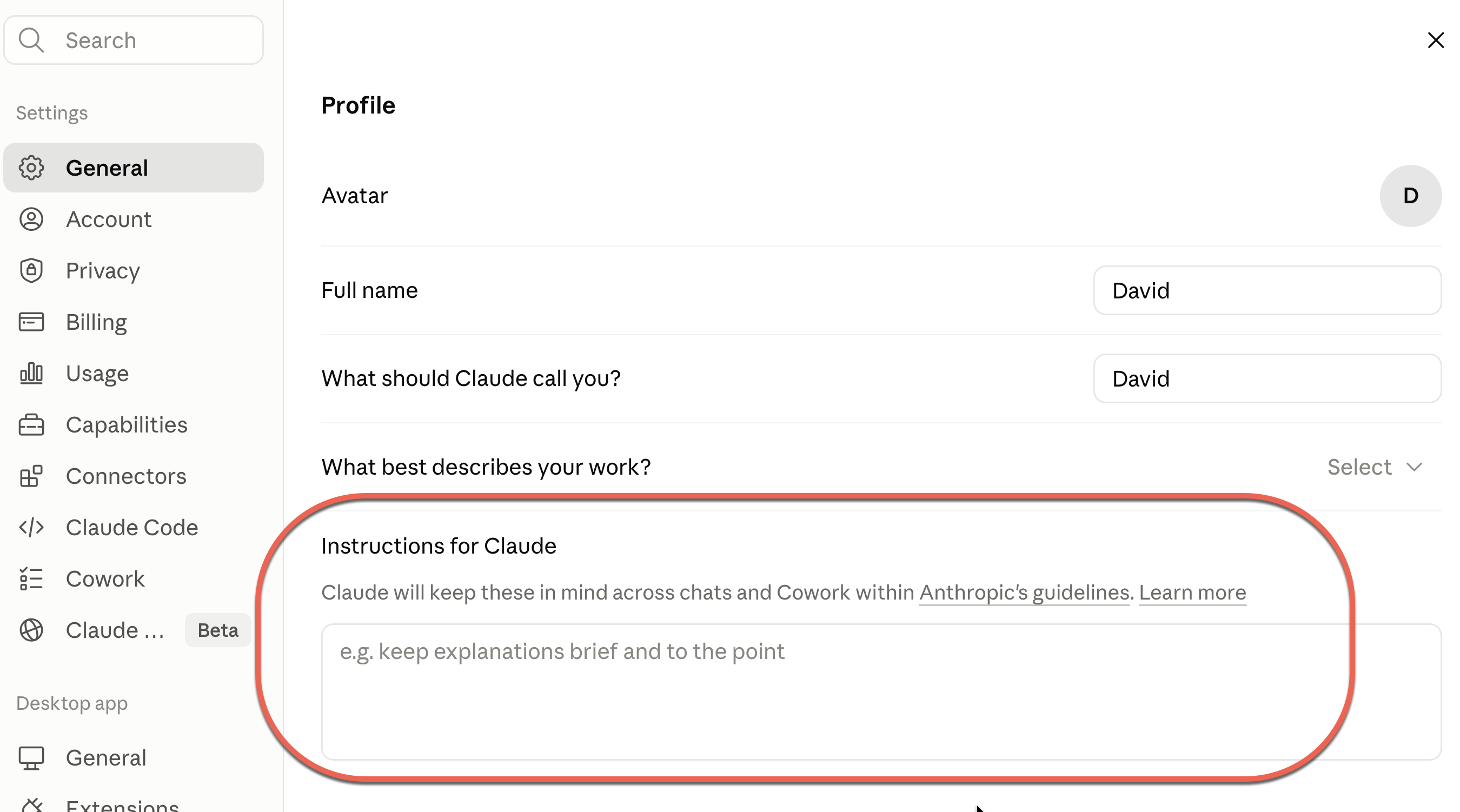
Claude: Go to Settings → General → Profile and paste your profile into the Instructions for Claude. Every chat starts already knowing you.
ChatGPT: Settings, then Personalization, then Custom Instructions. Your profile goes in the “What would you like ChatGPT to know about you?” box.

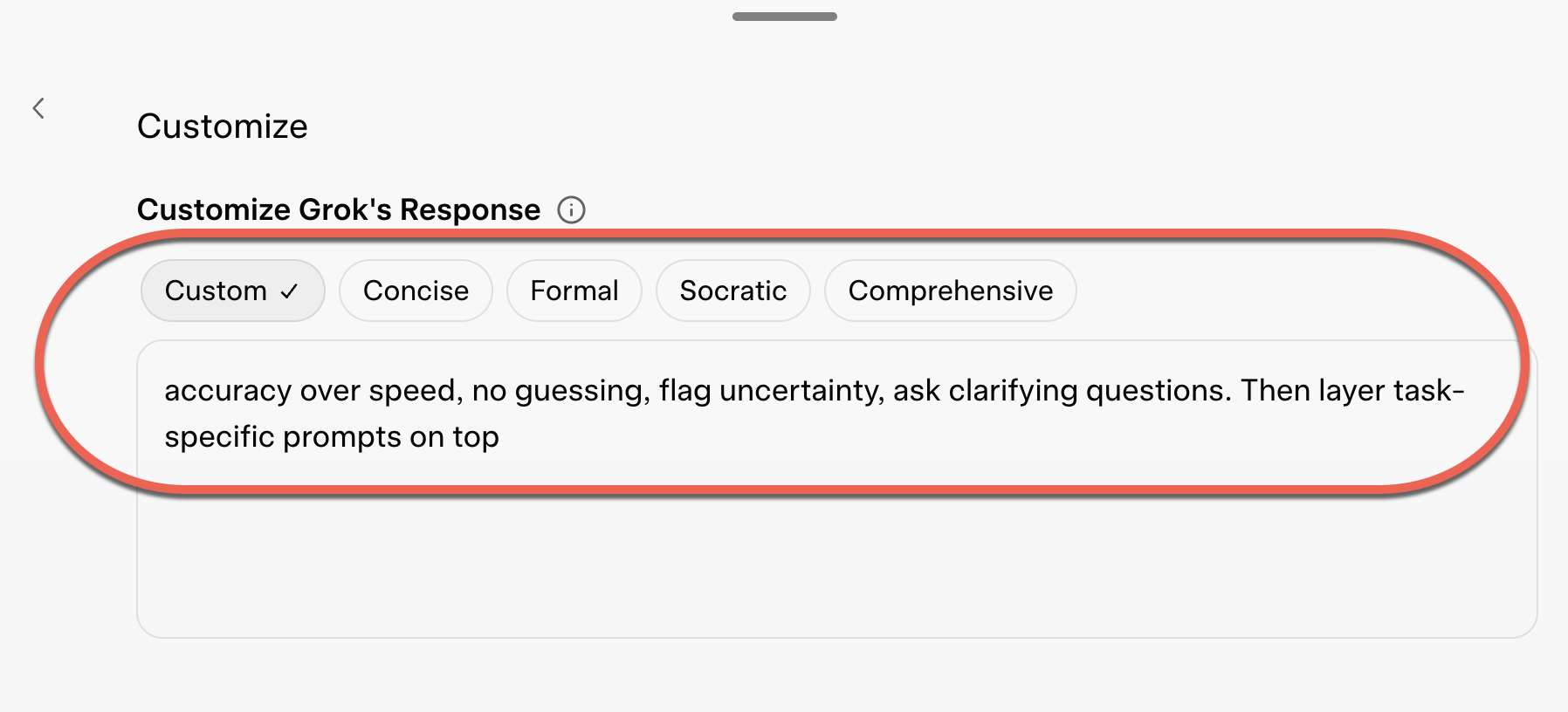
Grok: Settings → Customize → Customize Grok’s Response
Gemini: Settings, then Saved Info. Same content, same effect.
The before and after that sold me
I asked the same question two ways: “Give me three ideas to grow my email list.”
In a cold chat, I got: post consistently on social, run a giveaway, add a popup. Thanks, internet.
With my profile loaded, it knew I run a small newsletter solo, I hate gimmicks, and I want things I can do in an afternoon. So it gave me three ideas sized to me, with the trade-offs spelled out. Same model. The only difference was that it knew who was asking.
💡 “Most people try to fix generic AI answers with better prompts. The real fix is making sure AI knows who it’s talking to.”
The full kit, with the fill-in profile, the setup steps for each tool, and the four prompts that build and maintain it, is in the free download above.
If you’re newer to all this, the 4 AI skill levels issue shows where personalization fits on the curve, and the tool stack issue covers which AI to set this up in first.
🎯 Try this today: Write just the first three lines — who you are, what you usually need, and how you want answers. Paste them into your AI before your next question and watch what changes. Then
One more thing. I’ve been quietly working on something for the past few months. It’s the biggest thing I’ve made since starting this newsletter, and if you’ve taken the quiz, you’re going to want it. More next week.
Related guides
- The AI Memory Kit
- You’re Only Using 30% of Claude AI — The Part of Claude Most People Never Find
- How AI Chatbots Really Work!
- AI Terms Explained: A Plain-English Glossary
Frequently asked questions
How do I stop having to re-explain myself to AI in every new chat?
Write a short standing profile and paste it into your AI's memory or custom-instructions setting so it loads before every conversation. Cover who you are, what you usually need help with, how you want answers formatted, and a couple of ground rules. You do it once and every answer afterward gets sharper without you repeating yourself.
Where do I add custom instructions in ChatGPT, Claude, and Gemini?
In Claude, go to Settings, then General, then Profile, and paste your note into the Instructions for Claude box. In ChatGPT, it's Settings, then Personalization, then Custom Instructions. In Gemini, it's Settings, then Saved Info. Grok keeps it under Settings, then Customize, then Customize Grok's Response.
Why does AI give such generic answers even with a good prompt?
Usually because it has no idea who it's talking to, not because the prompt is bad. A cold chat answers a stranger, so it defaults to the most average response. Once it knows your role, your situation, and how you like things, the same question comes back sized to you with the trade-offs spelled out.
What should I include in an AI profile about myself?
Keep it to about nine lines in three parts: who you are and what your work involves, how you want answers (short and direct, step-by-step, examples first) plus your voice and pet peeves, and a couple of ground rules. Two rules worth adding: ask a question instead of guessing when unsure, and push back if you're about to make a mistake.